Wednesday, November 8, 2017

OBDSTAR X300 DP renew key PCF79XX adapter unlock Audi 5 Generation key

Host on how to use Car Scanner OBDSTAR renew key PCF79XX adapter to unlock Audi 5 Generation key by working together with OBDSTAR X300 DP(Orange)/ OBDSTAR  key master DP(Green). Besides, OBDSTAR renew key PCF79XX adapter is designed for BMW, VW, Volvo, Chrysler, Renault, GM, Kia, Hyundai etc.
To unlock Audi 5 Generation key, please prepare the two tools:
OBDSTAR renew key PCF79XX adapter
OBDSTAR X300 DP or OBDSTAR key master DP
Guide:
Plug OBDSTAR X300 DP with VCI box, renew key PCF79XX adapter etc shown as below picture, make sure the indicator lights flash.
FYI, OBDSTAR X300 DP (Orange)VS OBDSTAR key master DP(Green):
They are the same tool, they have same function, save vehicle coverage. They differ from each other in color, the orange one OBDSTAR Scanner X300 DP is supplied on Eshop, so it does not need to waste money to order both two.
Tap X300 DP option “DP” then “Diag Program”.


Tap “Other Function” then “Unlock Key”.


Have option “Renew key V30.01”, click “OK”.

Tap “Audi”, then “5 Generation”
 
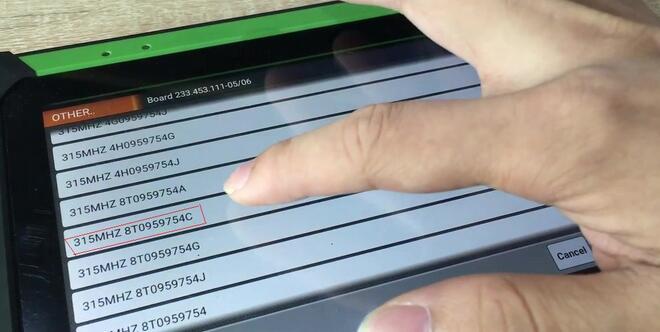
Have 3 options shown as below, go to check the chip board number and tap “Board 233.453.111-05/06


Tap “315MHZ 8T0959754C”
 
Please refer to the following figure for the correct connecting line.

Pop up “Connect the host to the PCF79XX adapter and supply the 12V power to the adapter.” Tap “OK” and writing data, please wait……
Data Brushing successful, click “OK”


OBDSTAR F108 PSA read Peugeot Citroen DS Pin Code fast

Half month ago I noticed OBDSTAR F108 PSA, a pin code reader& key programmer for Peugeot and Citroen. Here I share my good experience with OBDSTAR F108 read pin code for Peugeot 508, Citroen C5 and DS5.

Good impression at first! This tool has simple but robust frame, it is hand-held with a 16-pin connector.

Now I will show you how I read out Peugeot 508 pin code:
Start form the main menu, I choose Function, Immobilizer, Peugeot/ Citroen/ DS V31.09. It is initializing and authoring, then I choose Peugeot.

When go to Read Security Code, it tells me to turn on ignition and turn off then turn on it again.

OK OBDSTAR F108 pin code reader read out 2011 Peugeot 508 security code immediately!

I also tried it on a 2011 Citroen C5, read out pin code in 3 minutes. And on Citroen DS5 pin code read out in 1 minute. I think the reading speed may vary from different cars, but in my view it is fast.

After use OBDSTAR F108 to read pin code2011 Peugeot 508, 2011 Citroen C5 and DS5, I can say the menu and instruction English is clear and simple to understand. So this pin code reader is easy to use. As to its key programming function I haven’t add key, so this function wait for test. In the end, I hope my experience can help you!

Thursday, November 2, 2017

How to reset climate control module with Volvo XC90?

This post aims to use Volvo XC90 to reset climate control module(CCM) to remedy HVAC blend door noise.

Symptoms:
Every now and then, I noticed hooting owl coming from the dashboard. Not too intrusive a sound, but then again when it came to this noise I still conjured up the Tears for Fears lyrics “these are the things I can do without”.

Reasons:
it was one of the doors that redirected the airflow in the HVAC system, or perhaps a bad bearing in the blower motor, but given the paucity of other symptoms I was coming up dry otherwise.

Suggests:
1) replacement of the blend door motors, which is rather labor-intensive.
2) reset the CCM (Climate Control Module), which is performed with VIDA and a DiCE unit. Since a reset takes first precedence over an RMA, the next steps were logical.
Finally, I take the second suggest.

Guide:
Once the DiCE unit is connected to VIDA, test the communication using the “vehicle profile” tab. Select the DiCE unit from the drop-down menu. If the communication test is unsuccessful, check the LEDs on your DiCE to ensure a logical connection has been established. Check your USB drivers and whether the DiCE unit is detected. If you are using a Windows 7 virtual machine, ensure that the physical USB interface has been assigned to the virtual machine instance you are utilizing. In a virtualbox setup this requires clicking the USB icon on the right side of the taskbar and clicking on the DiCE unit.

VBOX-VOLVO XC90 Steps Display 1
An interesting note is that “working sound from the damper motors may exist”. I presume this means the initial startup sounds, but probably not the constant hooting owl (others described it as dogs barking in the distance).

The engine should not be running; if it is, the DiCE unit will become logically disconnected when the calibration is started. Turn it to ignition position II as described in the “Calibrating the CCM” fault trace guide. Click on the VCT2000 symbol to begin the test. The blend doors in the dashboard will all actuate. Wait a minute or so after the test has been completed before turning the ignition off.
If the Climate Control Module (CCM) reset has been completed successfully, you will be presented with the message below. If a CCM reset does not remedy the noise, I would suggest performing the procedure one more time in the event that a blend door was physically stuck. If the noise persists after multiple CCM resets I would suggest re-evaluating the source of the noise by testing various HVAC settings to ensure it is a blend door (fan off/on/low/high, recirc, AC compressor on/off, upper/mid/lower vents open and shut, etc). After that I would suggest assessment by a qualified service facility for possible hardware replacement.
Done
Credits to timthurber.

TJECU CN900mini 1.32 new “Partial 48 Decoding and Copy” function test result

Here are the results of the TJECU CN900mini latest version (1.32) new “Partial 48 Decoding and Copy” function tested on VW Golf MK 4 , year 2002. Was Magic 2:
You have to update to version 1.32
Decode button is now working. After pressing the decode button, you have to sniff data from ignition lock of the car.
After that, decoding starts, and lasts for AT LEAST 20 minutes. You can see at the picture, that decoding is already 20 minutes in progress.
After that I left it for another 40 minutes. When I came back, the decoding was finished.
As you can see, the Secret Key is visible, but it shows “xxxx xxxx”
I don’t know what the meaning of those “x”-es is.
After the decoding, the function “Unlock” is working.
Also “copy” button is shown for coping to CN6 chip. I had no CN6 chip to test.
The problem here is that decoding time is very long. Almost 1 hour, I think device isn’t cloning ONLY the chip ID, So it has to be password or security bytes.

After this 1.34.2.19 update, ID48 cloning is working, I can confirm.

FYI, I always order cn6 transponder for id 48 for mini cn 900 from here. It’s the guy who also sells CN900 mini devices. Tested and it’s working (for version above 1.20).

(Duracell2 post link from Ali, but I recommend obdii.net since it’s a reliable dealer)

To sum up 
CN900 mini is just fine. This device is not as fancy or as powerful as Handy Baby, but hey CN900 mini is much cheaper and the transponder chip are also much cheaper than Handy Baby ! Most importantly, it works for cloning various transponders which are popular in the market name it 4D and 46 !!

Lonsdor K518ISE program BMW FEM BDC key even all key lost

Lonsdor K518ISE is a newest key programmer tool which is verified to program BMW FEM BDC key(for all key lost, enter 32-bit ISN code) in the dismantling FEM module method (same as Xhorse VVDI2, Yanhua BMW FEM key programm, etc.), what a nice feature is the Lonsdor official notice: the BMW-FEM/BDC is updated for free, no more charge for the authorization or update, no more token.

Steps with words & pictures:
Tap Immobilization->BMW-> by IMMO system->FEM/BDC
BMW-FEM/BDC Functions introduction:
1- read key information: read out key data and prompt that if the immobilizer system needs pre-processing.
2- Pre-process FEM/BD system: backup original coding data, read out EEPROM, generate the service mode EEPROM data, program, restore the original EEPROM data, restore coding codes (for the details, please read the operation guide).
3- Generate dealer key: program a new key as a dealer key.
4- enable key: set a “disabled” key to “used”.
5- disable key: set a “used” or a “lost” key as “disabled”.
6- delete key: delete keys that are unnecessary or lost.
Steps:
Mainly 3 steps: read key info->Pre-process FEM/BD system->Generate dealer key.
Read the operation instructions in the below picture, as you can see, when you make dealer key for all key lost, enter 32-bit ISN code.
Step 1. read key info
Before operating other functions, you must read key info firstly including VIN, type, current key position and kilometers etc (see below picture).
Step 2. pre-process FEM/BDC system
1: OBD backup the original coding data:
Connect the FEM/BDC system on the car or the test platform, then backup the original coding files via OBD.
2: read out EEPROM backup data & generate service mode EEPROM:
  • Remove the FEM/BDC module, find out chip 95128 or 95256, read EEPROM data using an ECU programmer e.g VVDI-Prog, Orange5 etc.;
  • Importthe EEPROM data into the customfile folder of Lonsdor K518ISE;
  • Enter the program, read original EEPROM data and generate servicemode EEPROM, export the service mode EEPROM data, write it into the chip 95128 / 95256 with the ECU programmer.
  • Restore FEM/BDC system, supply power to the car and connect via OBD
3: programming
  • This procedure requires to be done on the BMW FEM/BDC test platform, meawhile you have to ensure that Step 1 & 2 is finished.
  • Supply power to the FEM/BDC system and connect it to the OBD port.

4: restore EEPROM data
  • Remove FEM/BDC module, write the original EEPROM data (Step 2) into chip 95128/95256
  • Restore FEM/BDC system, supply power and connect to OBD

5: restore coding data
Load the coding files that are backed up in step 1, restore coding information via OBD

6: pre-processing is done.

Step 3: Generate dealer key.
1: Lonsdor K518ISE Programmer reads out data, select the key position to be generated.
2: Choose “by original car key” to make a dealer key, for all key lost: enter 32-bit ISN code
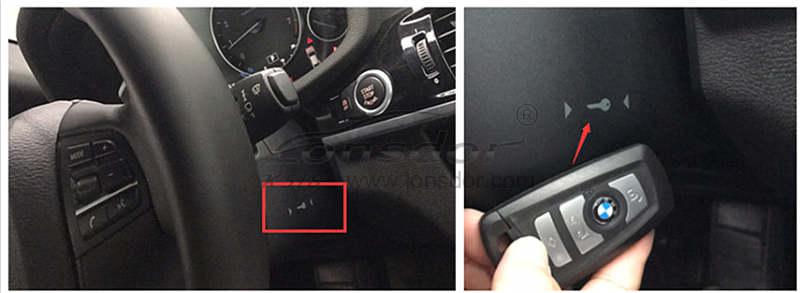
3: Put the original key near the car immo induction loop
Lonsdor-K518ISE-program-BMW-FEM-BDC-key-07
4: Detecting the original key, read out immo data
5: Put a new key near the car immo induction loop (see the above picture)
6: Detect the key key, learn new key (don’t move the key, keep stable)
7: key learn complete.

Step 4: disable the key
1: Lonsdor K518ISE read out data, select the key ID position to disable
2: Put a working key near the car induction loop
3: K518ISE system tries to connect to CAS, disable the key in the current ID position, disable key with success.

Step 5: enable the key
1: Lonsdor K518ISE read out data, select the key ID position to enable
2: put a “used” key near the car induction loop
3: K518ISE system tries to connect to CAS, enable the key with current ID position, enable key successfully

Step 6: delete the key
1: K518ISE read out data, select the key ID position to delete
2: read FEM/BDC key pin code
3: delete the key successfully; the key position is blank

Tips (Very important):
1: Please remember to read key info before you want to operate any function.
2: 5 tips on pre-process FEM/BDC (all the dismantle operations need to power off)
1) via OBD to backup original code
2) Dismantle & read car EEPROM and import to K518ISE customfile.
3) Generate and write the service mode EEPROM data to FEM, re-install to program
4) Dismantle FEM and write back original EEPROM data, reinstall to restore EEPROM.
5) ECU programming: need 6 min, with power supply connected
6) disconnect to the power supply, disassemble CPU, write the original EEPROM data into the chip, install CPU on the car, connect to the power supply, make sure communicate is successful
7) upload coding files (Step 1), restore original coding info to pre-process, then make a dealer key

Done! Lonsdor K518ISE program BMW FEM BDC key.

VVDI2 vs Zed Full what is better for VAG & BMW?

VVDI2 vs ZED FULL what tool is better for VAG and BMW key programming?
Look here:
Rely 1: I have Zed-Full and to be honest it’s a bit of a disappointment. Slow bringing out anything new on the VAG front. Older A3’s and TT’s never seems to be able to read the pin when other tools do fine. Not great on newer Marelli dash especially doesn’t like the one in the VW UP. Never manages to read any CAS modules by OBD (used to ok but hasn’t successfully read a single one for months) on top of that it’s expensive to run.
I’m about to order VVDI2 (Would have updated my AVDI but not going to be forced into dealing with KAP)
 
Reply 2: i have vvdi2 and zed full. for vag and bmw vvdi2 is best for me
zed full is good too for other marks

Reply 3: I had Zedfull for almost two years.
The day I bought it was happy day that week.
The day I sold it out was happiest day in my life  .
VAG mostly if I couldn’t do with other tools Zedfull also cannot (PIN CODE).
Pretty expensive device for using indeed on tokens. Learn key for Passat B5 can cost about 25 – 30 tokens if procedure go okay (example),
pin code 20 + 5 or 10 for learning. Almost 20 years old car.
Hah chinese 100$ cost device can do the job with blink. These cars should be there for free for the price device cost.
VAG immo 4 chinese ID48 cannot learn but tokens take. Support says: “Use original or zedfull ID48” .
Basically support not very good, they reply sometimes . If you loose some tokens because the device CANNOT or wrong transponder you never gain them back but the claim before buy was different.
Did not try BMW when you see how many tokens they want  – 50 tokens (about 35$) for key. What do you think for try?
Mitsubishi smart key cannot add, chinese device learn key with blink.
This device is for dummies… click there … click here .. done. For begginers maybe good but not for professionals.
I was disappointed with the device and support.

Reply 4: I have both, vvdi2 is better, ZED FULL always delay with their softwares and updates compared with other tools.

Reply 5: i agree. also have a zedfull, in bmw is my only option (have a tcode pro but dont buy bmw modules). made a few bmw, a x5 and x6 by obd and work fine, and a mini too. in vag is not very updated, sometimes in vw brazil have a few issues, for ex: trying to make a all key lost 2015 voyage, read pin ok, and tell me wait 15 min for security, then make weird config and dashboard say key 2-6, dont accept more keys, try again, wait another 15min, and again, i want 2 key and zedfull put 6 in programming. tcode make ok in the first attempt

Reply 6:  if you need good tool for BMW CAS/MB EZS (read and write MB IR key), buy xhorse vvdi2. it makes keys over OBD (90% of VAG and BMW can be done by OBD in VVDI2) and includes all the VVDI functions

In summary, 
If you looking only for VAG + BMW , then VVDI2 and VVDI prog is way to go. No need any other tool. In VVDI2 you have also programmer similar to Tango that you can make keys buy dump, but 90% of VAG and BMW can be done by OBD in VVDI2.

VVDI programmer don’t have OBD it’s only for bench programming.
Good for CAS4, FRM, EZS, EWS4 and many more.

Vpecker E4 Tablet/Phone Vehicle Software Update

Hot  Vpecker E4 Tablet  and  Vpecker E4 Phone  Scanner now both update V13.3 This update add new function to HONDA, ACURA, LEXUS, SCION ...