Sunday, August 20, 2017

YH BMW FEM Key Program Blade Key

Here several YH BMW F Series CAS4+/FEM Blade Key 315MHZ / 433MHZ in different colors, they are working together with YH BMW FEM key programmer, YH D3, CKM100 and other tools which can program and reset BMW key.
 Yanhua BMW FEM Key Programmer
Features:
1. Able to read and write key unlimitedly & repeatedly
2. Support FEM models with original non-blade keys.
3. Add new keys or modify old keys with/without three resistors (If you want to order the program without 3 resistors, please contact with the supplier)
4. Smart key.
BMW Models Compatibility:

Here we go to see these keys one-by-one.

Friday, August 11, 2017

LAUNCH X431 ICARSCAN VS M-Diag VS Idiag VS Easydiag

LAUNCH X431 ICARSCAN for Android/IOS with 5 car software and 3 specica function software free .
Launch Icarscan is a professional automotive diagnosis tool which manufactured by LAUNCH company. This is a specially designed auto code reader.ICarScan is a smart phone based vehicle OBD2 and full sysatem diagnostic tool designed with the professional technicians and DIY enthusiasts in mind.
There are 5 reasons for you to get Launch Icarscan :
  1. Launch Icarscan Build-in bluetooth, easily connects with Android/IOS smart phone and tablet. The device is small and portable, yet powerful enough to rival its competitors.
  2. Launch Icarscan replacement LAUNCH X431 IDIAG , LAUNCH X431 Easydiag and LAUNCH M-Diag. Users have the option to purchase manufacturer spceific carline software based on their needs. LAUNCH ICARSCAN Support the generic OBD, CAN bus, and proprietary protocols of over 70 car manufacturers and 2, 500 car models. 8 free brand of software for your selection:5 car line choice(fullfunction software), 3 special function software choice. If you need more other softwares, pls buy it from APP store.
  3. Launch Icarscan Support Special Functions like RESET SAS, RESET BMS, RESET BLEED, RESET BRAKE, RESET DPF, RESET ETS, RESET GEAR, IMMO & key programming, RESET INJEC, RESET OIL, RESET TPMS and so on.
  4. Launch Icarscan Support Multi-Language:English, Chinese, Spanish, French, Russian. You can choice the language by yourself.
  5. Launch Icarscan (M-diag) Update Software Online. You can free to download any 5 software with 3 special functions in any time.

Thursday, August 10, 2017

How to use SKP1000 to Adds Folding Key to Range Rover 2008

Guide to add a 3-button folding key to Land rover Range Rover Sports 2008 model by SKP1000 key programmer via OBD.
Original key: 3-button Folding key
Frequency: 433MHz
Chip: ID46
Remote Programming: Program chip key will generate remote automatically
Security pin code: No
Device: SKP1000 tablet auto key programmer
Guide:


Connect SKP-1000 key programmer with vehicle via OBD diagnostic socket
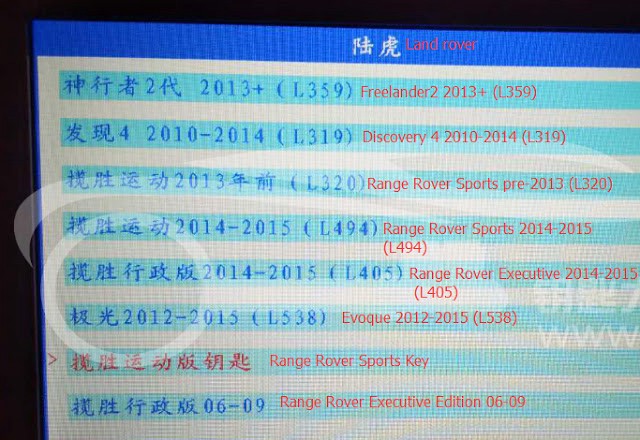
Select car brand icon: Land Rover


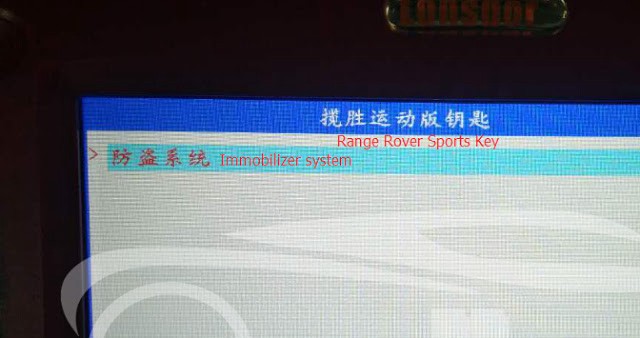
Select Range Rover Sports key


Select Immobilizer system

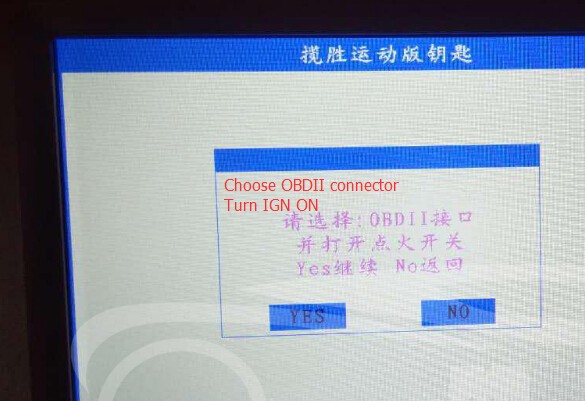
Choose OBDII connector
Turn ignition switch to ON position
Press YES to continue

Select Program key

At least 1 registered key is required
Press YES to continue

Insert the registered key
Press YES to continue

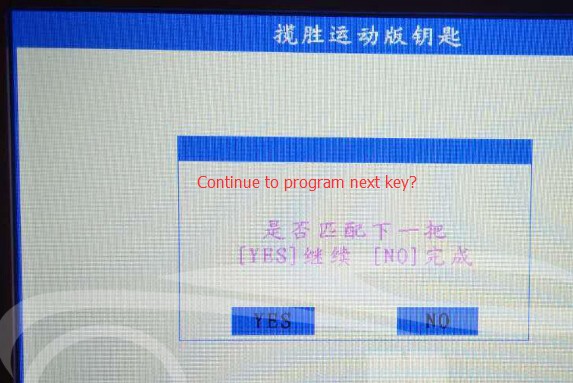
SKP1000 prompt whether to program next key, press YES to continue

Insert a new key, do not switch ignition ON this time
Press YES to continue

Continue to program next key? Press YES to continue


Turn ignition ON
Then turn ignition OFF

Program success.

Tuesday, August 8, 2017

BMW INPA works on 2008 E60 M5 error vehicle not identified

I recently installed ISTA+, INPA / EDIABAS and NCS and follow instructions from available resources online for establishing a connection with my 2008 E60 M5, but was met with the message:
The vehicle could not be identified. Please check the access to the vehicle and check whether testing-analysis-diagnosis has been activated

I’m fairly certain I followed the installation instructions properly, so my inclination is to believe that my problem could possibly be the cable. I honestly don’t remember where I got the cable. I got it probably 4-5 years ago and never got around to installing ISTA or DIS.
Would anyone be able to tell by looking at the cable? I’ve attached a picture of the cable that I have.
So, this is the exact cable I bought awhile back on obdii.net
Finally solved!!!
I had successfully reinstalled everything again and that I had tried establishing a connection with the vehicle and that it had failed (which it did). However, I thought of something and decided to try it before posting that message. When I installed this time around, I noticed that there are TWO ediabas.ini files; one of them is in the EDIABAS directory under the system drive (C:\EDIABAS\Bin\ediabas.ini), along with the obd.ini, and the other is in the Rheingold directory (e.g C:\Rheingold\Ediabas\BIN\EDIABAS.ini, or wherever you unpacked Rheingold.7z).
I opened up the EDIABAS.INI in the Rheingold directory and changed the Interface = Remote to Interface = STD:OBD and then tried establishing a connection and it worked this time.

Unfortunately, the BEGINNERS GUIDE TO ISTA+ PDF only mentions the ediabas.ini file under the C:\EDIABAS directory:

So, for anyone who maybe hasn’t been able to establish a connection to their vehicle with ISTA and has exhausted all of their options, this may be a good place to start.
Attached Thumbnails


Now, I need to perform a clutch adaptation -:D

VVDI 2 add key on BMW E88 without success, can winkfp or Autel Maxisys pro works

 Autel MaxiSys Pro MS908P
This post starts with a problem that BMW 1 series E88 add spare key by VVDI2, but not work…unfortunately, BDM not backup.
So any of winkfp or Autel Maxisys pro 908 is recommended to use
Question:
Hoping someone can help…
I have a BMW 1 series E88 came in for spare key. I followed normal procedure with VVDI to add key. It has CAS3++ ISTAP so I flashed the CAS using the software. Everything was ok so far. Added dealer key, which was successful. Read key info and it shows the new key and original key. But vehicle will not start and ignition won’t come on (just airbag light).
Remote central locking works on both new and old key. Tried DME-CAS + CAS-ELV sync but fails every time. I have tried connecting ACOM/ISTA but no terminal 15/ignition power.
Any ideas please?

Also, I have tried repairing ISTAP (which showed as successful) but still the same.
BTW, I did not make BDM backup.
Cas ID is 9395657 and when I insert remote/key steering in unlocked and just airbag and park brake light illuminated but turns off after a few seconds

Answer:
You should always make backup if possible. Especially for CAS3++ISTAP. And VVDI2 warned you to make backup before flash update…
If you would have spare cas units or lot of CAS data from similar cars then you could trust this OBD function and if it bricks the cas you would be able to get out from this situation with different solution… But now it’s bad…

Tool to recommend:
You have to try to update cas with winkfp or Autel Maxisys pro 908, It should work for sure

Option 1: Have winkfp, but how?
Have you got inpa installed? You have to know what software has cas indentifying it in inpa and/or tool32 and then program with winkfp knowing the se version of cas. Years ago ista/p crashed a m6 cas and I managed to recover it with winkfp.
Instructions on how to update a module with WinKFP:
1 Start WinKFP and select F3:- Update ZUSB
2 Select ECU type and the ECU will appear along with a list of part numbers.
3 Select ok and the main menu will re-appear
4 Select VIN and enter the cars VIN no. and select OK.
5 Select Done
6 Select Prog. ZB_update, you will be asked to confirm the update, Winkfp wil state the number of times the module can be re-programmed.
7 Sit back and wait.
I did my TCU with my cars VIN no. and it took 35 mins over the OBD port.


VVDI KEY Tool Remote Unlock Wiring Diagram

VVDI KEY Tool Remote Unlock Wiring Diagram

 VVDI Key Tool
Attach 40 pictures shown as below.


Vpecker E4 Tablet/Phone Vehicle Software Update

Hot  Vpecker E4 Tablet  and  Vpecker E4 Phone  Scanner now both update V13.3 This update add new function to HONDA, ACURA, LEXUS, SCION ...