Friday, November 24, 2017

Lonsdor K518ISE product service center: calculate key data easily

Lonsdor K518ISE product service center is designed to help users to calculate key data whenever and wherever. The users are free to login with email and password as they will in Chinese and English. So far it can calculate data for Volvo, Maserati etc by self-service without Lonsdor engineer help.

Guide:
  1. Browse: http://u.lonsdor.com

  1. Please enter the email and password (Must be the account when you register K518ISE)
3.Choose product “Lonsdor K518ISE
  1. Choose the car brand you want to calculate data, i.e Volvo.

  1. Choose the key type (i.e key (Non folding), that is the common key of S40, C30, C70)

  1. Calculate key data operation
Bellow operation applies to other keys.
1). Input the serial number that you are using.
2) Choose the car model i.e S40, C30, C70 etc.
3) Input the right No.(2) data, then the left NO.(1) data.
4) Submit.
Note: read “Help” at the bottom for instruction.
  1. The system automatically calculate data and the page will automatically refresh until the result displays.
Tip: If the data is put in the incorrect position or incorrect, the data will be calculated unsuccessfully.
  1. Lonsdor K518ISE calculate key data for Volvo successfully, please click on “Download data”, and follow the “Operating guide” to input the corresponding folder.

Wednesday, November 22, 2017

VCDS VAG COM 17.8.0 software download,installation and use

VCDS VAG COM 17.8.0 software download,installation and use

1.Software download
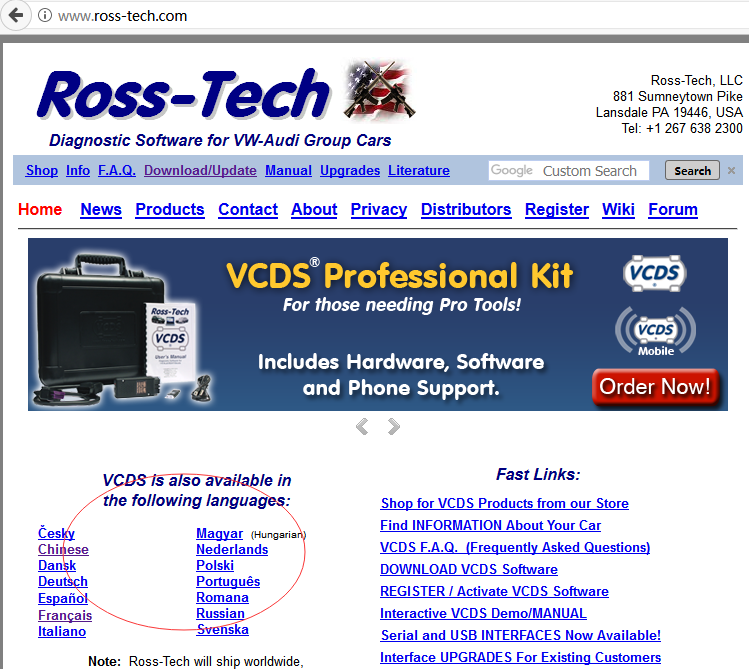
1.1Enter the website (www.ross-tech.com),as shown:
1.2Choose language
1.3Click Download


1.4 Put the software you downloaded to the desktop
2.Installation and use
2.1 double click the icon desktop,wait for installing,as shown:


2.2 Run VCDS software,connect VCDS VAG COM to your computer USB interface
2.3 Click options
2.4 Click Test,show that VCDS VAG COM hardware has been activated
2.5 Then click save,you can use VCDS VAG COM to test your car
2.6As shown,choose function you want


Thursday, November 16, 2017

Free download Ultimate Ediabas/ISTA+ voltage control V3

I  made a small utility suite which allows manual control of voltages which Ediabas sees from the interface such as OBD or CAN. It also includes additional ISTA+ support so it should work with ISTA as well. It’s not dependent on INPA or ISTA versions and should work with any version of INPA, ISTA+ and others as well as it integrates between ediabas and cable driver and is completely transparent to high level software. Additional support for ISTA+ should work with any modern version as long as internal code will not change much. My aim is to make it so all ABLs and other procedures work flawlessly.

The link to the suite
Version 2.0
Version 2.0 of this tool has been released. New features:
1. It now checks the actual interface type setting in ISTA during runtime, so if you switch from Ediabas to ICOM it will stop interfering and resume operation as soon as interface type is set back to Ediabas.
2. It now supports K+DCAN cables which have an ability to detect clamp states (probably most higher quality cables). To use this feature control application should be closed. It will then read actual clamp states and update ISTA voltage states accordingly without any manual actions required. Starting control application will switch the operation to manual control. Closing it will resume automatic recognition.
Version 3.0:
Version 3.0 of this tool has been released. New features:
1. Control application can now be minimized.
2. Support for ISTA+ v4.05 (and hopefully above).
System requirements:
Visual Studio 2015 x86 runtime must be installed (same as required for last versions of ISTA+).

Installation instructions:
1. Go to Ediabas folder. For INPA its normally C:\Ediabas\Bin, for ISTA+ its in Ediabas\Bin folder with ISTA+ directory.
1. If you are using STD:OBD rename existing obd32.dll to obd32.ebas.dll. Users of other cable types rename respective dll (for example STD:CAN users rename can32.dll to can32.ebas.dll).
2. Extract the downloaded file.
3. Copy included obd32.dll to Ediabas\Bin. For other cable types rename it to respective name first (for example can32.dll).
4. For ISTA+ only: copy included NodeISTAVoltageControl.dll to Ediabas\Bin folder within ISTA+ installation.
5. For ISTA+ v4.05 (and above) only:
a) replace existing IstaOperation.exe within ISTA+’s TesterGUI\Bin\Release folder by included one (from respective folder based on ISTA+ version).
b) run included AllowFakeISTAOperation.reg file (choose x86 or x64 depending on your system being 32 or 64 bit respectively).
To manually control the voltage start included NodeEdiabasVoltageControl.exe application. This application can be placed in a different folder if wanted. Voltage can be adjusted by moving sliders or switched off using check boxes. Unchecking check box has the same effect as moving slider to 0V.
P.S. This voltage control utility is not designed to and will not influence voltages reported by BMW ICOM.
P.P.S. This utility works without any issues with original ISTA+, standalone not necessary.

Credits to Node

CGDI Pro Mercedes key programmer software V2.0.0.0 update on 11th Nov 2017

Benz Monster updated software V2.0.0.0 on 11th Nov 2017:
add content:
  1. Calculate the erase password function (including the engine computer, ISM computer, EGS computer, ELV)
  1. Calculate the key to enable the password function (you can directly use the disable key)
  1. Erase the lock function (support CAN protocol, K-line protocol)
4. write lock data function
  1. Write frame number function
  1. Activate the lock function
  1. Clear the TP protection function
  1. Calculate the key current track code function
  1. Add to determine whether the dealer lock
  1. Fix problems that can cause the program to crash under certain conditions
  1. Optimization part pop-up prompt box to enhance the stability of the program
  1. increase some tips, the operation experience more accurate

CGDI Prog MB Aliexpress or Amazon?
It’s up to you, if you have a trustworthy supplier to trade with, that’s nice. If not, recommend you goes through a sales site who claims their CGDI Prog MB is original with after-sales service.

CGDI Prog MB for sale on this site:

2017 Super SBB2 Key Programmer VS SBB V46.02 VS SBB V33.02 VS CK100 V46.02

2017 Super SBB2 Key Programmer can perform both immobilizer function (key programming & pin code read) as well as mileage adjustment, Oil/service Reset, TPMS EPS,BMS etc. Super SBB2 is different from SBB V46.02, SBB V33.02 and CK100 in package, functions, vehicle coverage and year, language available, etc.

Here we go one by one!
  1. The different: package
1) Attach SBB2 Key Programmer package and adapters pictures: good quality of main unit, OBDII-16 connector, HONDA-3 connector, HYUNDAI/KIA-10 connector, KIA-20 connector, main cable, TF card reader and TF card in the unit.
Enlarge SBB2 main unit and you can see the main cable port, keyboard and the USB port, all are designed firmly.
 

 SBB2 unit and all adapters will be in such a box and ship to you.
 
2) V46.02 SBB Key Programmer package VS SBB V33.02 package:
(Pic 1: V46.02 SBB Key Programmer package, good quality of SBB Main Unit, OBDII cable, AC adapter and one CD with user manual)
(Pic 2: V33.02 SBB Key Programmer package: SBB Main Unit, OBDII cable, AC adapter and one CD with user manual)

  1. The different: Functions
2017 Super SBB2: immobilizer function + mileage adjustment, Oil/service Reset, TPMS EPS,BMS etc.
SBB2 immobilizer function list:
  1. New keys programming;
    2. Reads keys from immobilizer’s memory;
    3. New immobilizer programming;
    4. New ECU programming;
    5. New mechanical key number programming;
    6. Vehicle Identification Number programming;
    7. Reset ECU&reset immobilizer;
    8. Easy to operate by the guided menu programming;
    9. New remote controller programming;
    10. Immo PINCODE reader;
    11. Odometer adjustment(Via obd);
    12. With full and strong database for the most important vehicle makes;
SBB V46.02 function list:
  1. Programming new keys.
    2. Reading keys from immobilizers memory
    3. Deactivating keys no longer in the car owners possession
    4. Operation by means of a menu guided programming
    5. Programming new remote controls
    6. Software with full database containing all the most important vehicle makes
CK100 function = SBB V46.02
SBB V33.02 function list:
1.reading keys from immobilizer’s memory
2.deactivating keys no longer in the car owner’s possession
3.operation by means of a menu guided programming
4.programming new remote controls
5.software with full database containing all the most important vehicle makes

  1. The different: vehicle coverage and year
1) 2017 Super SBB2up to 2017.3 year.
Immobilizer:  ACURA, AUDI, BAIC, BESTURN, BRILLIANE, BYD, CHANGAN, CHANGHE, CHERY, CHRYSLER, CITROEN,  DFLZ, DFPV, DS, FORD, GEELY, GM, GREATWALL, HAFEI, HAIMA, HAWTAI Motor, HONDA, HONGQI, HUAPU, HYUNDAI, INFINITI, JAC, JAGUAR, KIA, LANDROVER, LEXUS, LIFAN, LINCOLN, LUFENG, MAZDA, MG, MITSUBISHI, NISSAN, OPEL, PEUGEOT, PORSCHE,  RENAULT, ROEWE, SAIC ENGLANG, SEAT, SKODA, SMART, SSANGYONG, SUBARU, SUZUKI, TOYOTA, VW, YOUNGLOTUS, ZZMAZDA, ZZNISSAN;
OBDII: OBDII V20.80 for diagnose
BMS REEST: V18.13
Electronic Park Brak: V22.71
TPMS: V19.20
TPS: V27.66
Odometer: AUDI, VW, BENZ, Chrysler, Ford, GM, Porsche, Skoda, Seat

2) SBB V46.02 vehicle coverage VS SBB V33.02:
Toyota G chip works
works on Toyota Honda Ford up to 2014 year.
works on Acura 2012, Chevrolet 2013, GMC 2013.
SBB V33.02: up to 2011 year.


3) CK-100 V46.02


  1. The different: Language
SBB2 Key Programmer language: English
SBB V46.02 Language: English, Italian, German, French, Spanish, Portuguese, Turkish
SBB V33.02 Language:
English/Italian/German/French/Spanish/Greek/Portuguese/Turkish/Russian

  1. SBB V46.02VS CK-100 V46.02:
1) The same:
Same Toyota G Chip
Same software version
Same function
Same vehicle coverage: SBB v33.02 <Ck100 V99.99 <SBB v46.02=CK100 v46.02

Which one is more popular?
CK-100 V46.02,better quality at higher price.

Conclusion:
Super SBB2: wins in multi-functions, newest car models, etc.
CK100 V46.02: almost same as SBB V46.02, better quality and more popular by locksmiths.
Therefore, I highly recommend the above two pieces.

Vpecker E4 Tablet/Phone Vehicle Software Update

Hot  Vpecker E4 Tablet  and  Vpecker E4 Phone  Scanner now both update V13.3 This update add new function to HONDA, ACURA, LEXUS, SCION ...